Okay, so I don’t have a specific series for this and seeing as this is more of a programming tip, I’ll leave it out of the Visual Studio 2012 Tips series. Caller Information Attributes are a very useful and probably underutilized feature implemented in the C#5.0 Compiler. Caller Information Attributes allow you to see how your method was called. So forget having to sift through the stack trace in order to achieve diagnostic level logging, use Caller Information Attributes instead.
To do this, you will need to import the following namespace:
[sourcecode language=”csharp”]using System.Runtime.CompilerServices;[/sourcecode]
Then in the CalculateSomeStuff() method you create, add the following Attributes:
[sourcecode language=”csharp”]
public void CalculateSomeStuff(int paramValue, [CallerMemberName] string name = "", [CallerLineNumber] int line = -1, [CallerFilePath] string path = "")
[/sourcecode]
I have created two methods to call our CalculateSomeStuff() method. These are:
[sourcecode language=”csharp”]
public void CallingMethod1()
{
CalculateSomeStuff(0);
}
public void CallingMethod2()
{
CalculateSomeStuff(17);
}
[/sourcecode]
Now, in the CalculateSomeStuff() method, I force an error by dividing by zero. I can now trap detailed logging information in the catch of the try/catch:
[sourcecode language=”csharp”]
public void CalculateSomeStuff(int paramValue, [CallerMemberName] string name = "", [CallerLineNumber] int line = -1, [CallerFilePath] string path = "")
{
int Factor = 17;
int Result = -1;
try
{
Result = Factor / paramValue;
}
catch
{
string errorException = "An exception occurred in CalculateSomeStuff when called with a Parameter Value of " + paramValue;
string errorMember = "Calling Member = " + name;
string errorLine = "Caller Line Number = " + line;
string errorPath = "Caller File Path = " + path;
}
finally
{
}
}
[/sourcecode]
As you can see, I’ll get an error in this method when it is called from CallingMethod1() because we will get a divide by zero Exception. But the actual bit of code that I want to show you is the catch section.
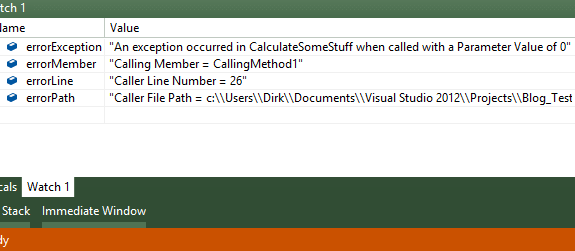
This information can be logged via a logging method of your choice (be it your own or Log4Net or whatever) and in doing so, provide valuable information of errors in your application.


